




For customer support teams · Tickets

No more customers having to repeat their story.

Telsmart puts a summary of every call on the right ticket in your system. Whoever picks up knows what was promised, by whom, and when.

  • Free plan, no credit card
  • Summary in the ticket, automatically
  • Queue with music, not silence
Support agent with a headset taking a call at her desk
Ticket updatedAI
Promised
Replacement unit by Friday
Owner
Sam · first line
✓Added to Zendesk ticket
What customers say
Nadia Cruts, Finance and Admin at Cardous Verzekeringen
“

When a call comes in, the number is recognised immediately and the client file opens automatically. Calls are logged automatically too. That saves us a lot of time.

Nadia Cruts
Finance & Admin - Cardous Verzekeringen
Ils Sterckx, founder of Matuvu Agency
“

I still think it's fantastic how fast you can change your own call flows with one click. In a meeting this afternoon, so I flip the right button and calls go straight to my colleagues.

Ils Sterckx
Founder @ Matuvu Agency
Herman Bogaerts, CEO of LEAGL
“

We no longer lose time passing along information the client just gave us. It's all right there in the CRM. I can just call handsfree and listen.

Herman Bogaerts
CEO @ LEAGL
Robby Hernalsteen, CEO of Afimo NV Insurances
“

At Afimo, we get dozens of calls every day from clients about policies, claims, and new insurance questions. So built in AI note taking in our telephony was a gamechanger for us. It saves us an enormous amount of time, and our client follow-up has noticeably improved.

Robby Hernalsteen
CEO, Afimo NV Insurances
Joé Vanspringel, Managing Director of E. Vanspringel & Zoon
“

We've been using Telsmart for over a year now and couldn't be happier. The cloud-based platform is user-friendly and easy to manage, giving us full control and clear insights into our telephony. Support has always been fast and professional. With its modern AI features and seamless apps across all platforms, Telsmart truly represents the telephony of the future.

Joé Vanspringel
Managing Director, E. Vanspringel & Zoon
Stijn Van Der Weeen, franchise owner of a Delhaize Proxy store
“

We used to get a flood of complaints, from staff and customers, that we were unreachable. Telsmart fixed that for us. Being reachable is now a competitive advantage for us.

Stijn Van Der Weeën
Franchise owner @ Delhaize Proxy
Joke Feyen, owner of Hout Feyen
“

Setting up a voicemail used to be half a day's work. Now we head off on holiday, rushing, and suddenly remember the phone. We just open the app, switch it over and we are done. It's a breeze.

Joke Feyen
Owner @ Hout Feyen
Glenn Van Loo, managing director of GVL Projects
“

Telsmart has changed not just the way I work, but my personal life too. The stress of clients calling at moments that don't suit me is gone. I can now automatically route calls, so the client still gets helped when I'm not available.

Glenn Van Loo
Managing Director, GVL Projects
‹
›

Your call history, two ways

Same desk. Same four calls. Different ticket.

Watch the switch flip, or flip it yourself. Either way, this is what the ticket shows.

Today’s activity
4 calls · 3 with a problem4 calls · 4 on the record
09:05
Mevr. Claes · second callYesterday’s customer calls back. A different agent answers.
Answered · 9 minNo note, no summary. The story starts from the beginning and Thursday gets renegotiated.
Summary already in the ticketReplacement ships Thursday · owner Sam · picked up mid-story
12:20
+32 47… · 4 callersTwo agents at lunch. Four callers, one line.
Rang out · 4 missedNobody leaves a message. Nobody gets a call back either.
Queued with music3 answered · the 4th got a one-tap Call link by text
16:40
Fietsen Verhulst · open ticket“I’ll call you back before five.” The promise lives in the agent’s head.
Answered · no noteThe head goes home at five. The next contact is a one-star review.
Promise in the ticketCallback before 17:00 · owner Sam · next step set
Fri 17:45
40 customers · outageThe platform is down. The office is empty.
Missed · generic voicemailNobody owns it. Callback Monday, churn mail Tuesday.
Incident button flippedStatus message on every line · on-call number offered

Names and figures are illustrative. The rows are what the app writes after each call.

When the call ends

No more “I'll have to check on that”.

Not a log line that says a call happened. A summary of what was promised, by when and by whom.

Every call summarized in your ticketing system

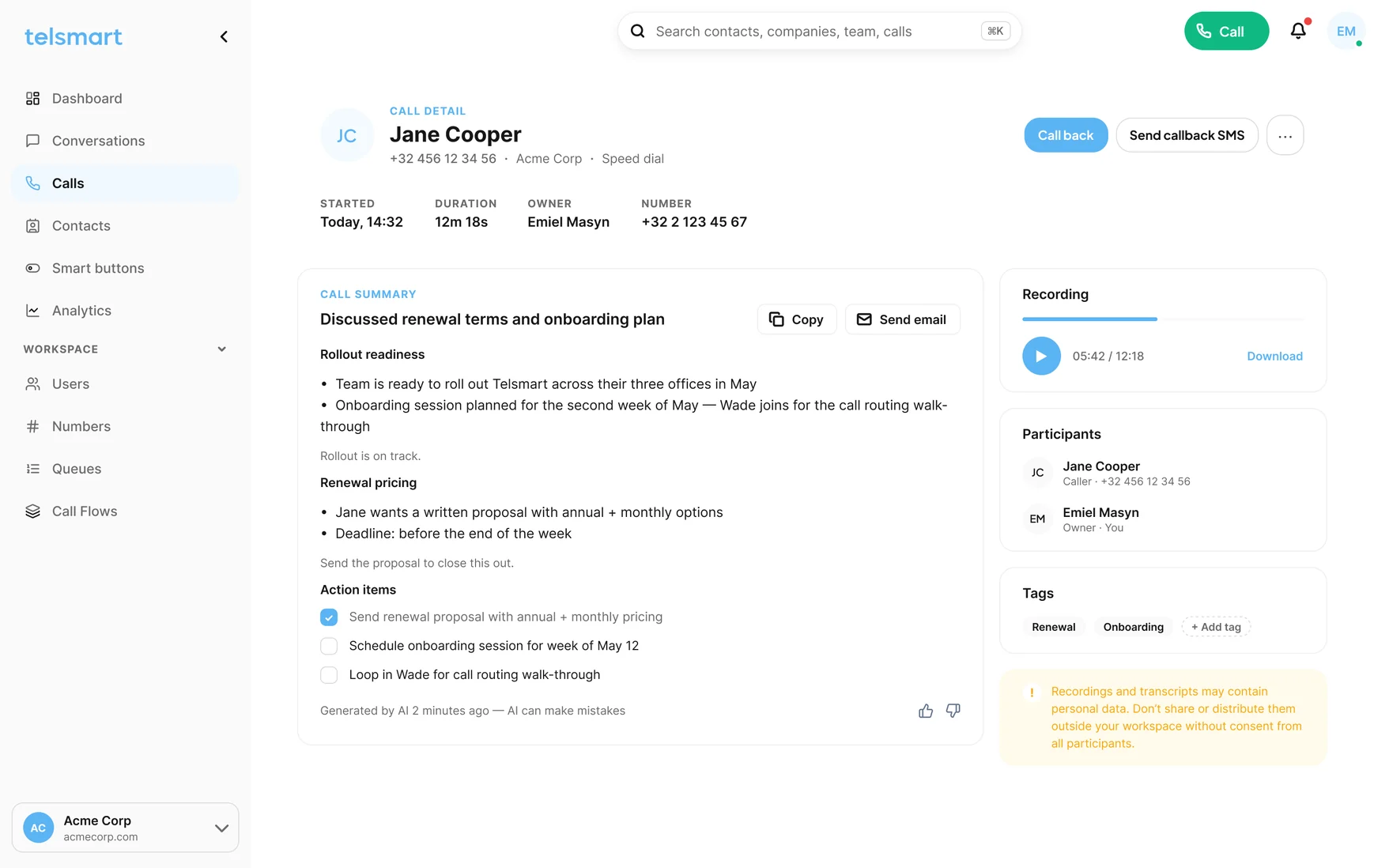
Our AI summarizes and files everything on the right ticket or contact record: what was promised, by when, by whom. Handovers without the retelling, escalations without the archaeology.

See AI call summaries →
Call with Mevr. ClaesAI
Question
Replacement for a damaged unit
Promised
Ships Thursday, owner Sam
✓Logged on the ticket

Connect callers straight to the right person

Ring everyone? Ring in order? Or a queue with music and a message. Build your own call flows in 6 simple steps. No IT skills needed.

Lunch peak · 12:20Queue
12:204 callers queued, music playing
12:22Sam answered caller 1
12:24Caller 4 texted a way back
✓Nobody rang out
See call flows →

Send missed calls a callback link

Nobody could pick up? Then the caller gets an SMS with a Call link from your number. One tap and they call back into the helpdesk, or the right colleague.

Sorry we missed your call. Tap to reach the desk now: telsmart.link/support
Sent 8 seconds after the missed call
See Call links →

Every call recorded and searchable, for everyone

Recordings sit next to the summary in your call history, searchable by name, number or what was said.

Escalation call · 08:12
✓Next to the summary
See call recording →

Switch fast when it's urgent

“Open”, “Closed”, “Meeting”: one button in the profile menu reroutes every line at once, the right way. Done? Flip it back. Simple.

Smart buttonIncident
Mode
Incident, since 17:45
Every line
Status message, then the on-call number
✓Flipped from the profile menu
See smart buttons →

Lives where your tickets live.

Calls, recordings and summaries land on the ticket or the contact record. HubSpot today, more connectors keep landing; Zendesk on the Custom plan.

HubSpotZendeskSalesforceMicrosoft TeamsTeamleaderMicrosoft DynamicsAnd many more
See all integrations →

Your agents remember the customer. The ticket should too.

Start free, summaries included. No card, no sales call.

Start free. No credit card needed.

Beyond the summary

Get smart insights into your calls with AI

Every summary is text your AI assistant can read. Connect the tool your team already uses and ask which issues came back often this week, or which customers were promised a callback and never got one. The answer comes from the calls themselves, not from the tags someone happened to set.

OpenAIClaudeGeminiCopilotPerplexityGrok
Office employee answering the phone at the front desk
Your AI assistant · on your call summaries
Which issues came back this week?
Login errors · 14 callsAll after Tuesday’s release
Invoice questions · 6 callsAll from the same billing run
Answer drawn from your own call summaries.
Your AI assistant · on your call summaries
Who was promised a callback this week and has not had one?
Mevr. Claes · promised Tue before 17:00No outbound call since
Fietsen Verhulst · promised WedClosed on Thursday without a call
Answer drawn from your own call summaries.

What the caller says, what you read

The call, and what lands on the ticket.

Not a transcript to scroll through. The question, the promise and the next step, as the next agent will read them.

On the call
CustomerThe replacement still hasn’t arrived. Your colleague said Thursday.
SamI see it left the warehouse yesterday. I’ll check the tracking and call you back before five.
CustomerAnd the invoice for the first one?
SamThat gets credited once the return is scanned. I’ll note it on your ticket.
→
AI call summaryAI
QuestionReplacement not delivered, colleague promised Thursday
PromisedCallback before 17:00 with the tracking status
ActionSam checks tracking, credit note once the return is scanned
NextCustomer expects the call today, before 17:00
✓Logged on the ticket in HubSpot · 16:44

Live on your desk number today.

No installer, no quote, no IT ticket.

+32 470 12 34 56✓
Verify your caller IDUnder a minute
Answer six questionsYour queue builds itself
HubSpot
Connect HubSpotOne click
How many customers told their story twice this week?
Create your free account today. No credit card required.
Oops! Something went wrong while submitting the form.
Telsmart AI call summary with action items, call recording and tags after a customer call
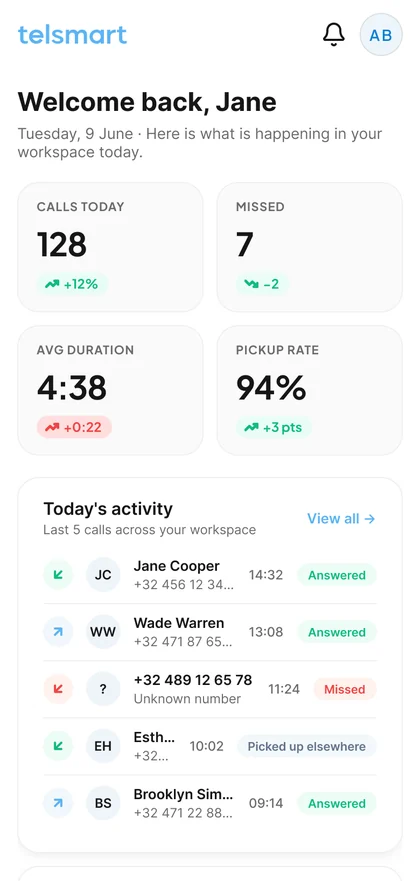
Telsmart mobile app dashboard with call statistics and recent call activity